
How to Track Expenses Without Connecting Your Bank
You don't need your bank password to know where your money goes. How to track expenses privately without a bank connection, in under a minute a day.
Short answer: you can track every shekel or dollar you spend with an expense tracker that never links to your bank account. Log each expense on your phone right after you pay (it takes a few seconds), give it a category, and look at your summary once a week. That is all a budget really needs.
Below is the exact method, why it often works better than automatic bank syncing, and how to do it in Japka.
Why people avoid connecting their bank
Bank-linked budgeting apps are convenient, but they come with real trade-offs:
- Security. You share login credentials or long-lived access tokens with a third party.
- Privacy. Every transaction you have ever made is copied to someone else’s servers.
- Reliability. Connections break, banks change their systems, and transactions show up late or twice.
- Availability. Not every bank or credit card is supported, especially outside the US.
And there is a quieter problem: when everything is imported automatically, you stop looking. The money moves, the app categorizes it, and nothing changes in your behavior.
Why manual tracking actually works
Writing down an expense yourself forces a tiny moment of attention: “I just spent ₪46 on takeaway.” That moment is the whole point.
There is research behind it. In a study published in the Journal of Consumer Research in 2001, Dilip Soman found that past payments lower people’s intention to buy more, and that the effect is strongest when the payment method makes them write down the amount (Soman, 2001). His experiments compared payment methods like checks and cards, not budgeting apps, but the mechanism is the same one you use when you type an amount into an expense tracker: you rehearse the cost, so you remember it.
Manual tracking also gives you cleaner data. You choose the category, you write who or what it was for (“birthday gift for Dana”), and you can split installments properly instead of guessing from a bank statement.
The 3-step method
1. Log it right after you pay
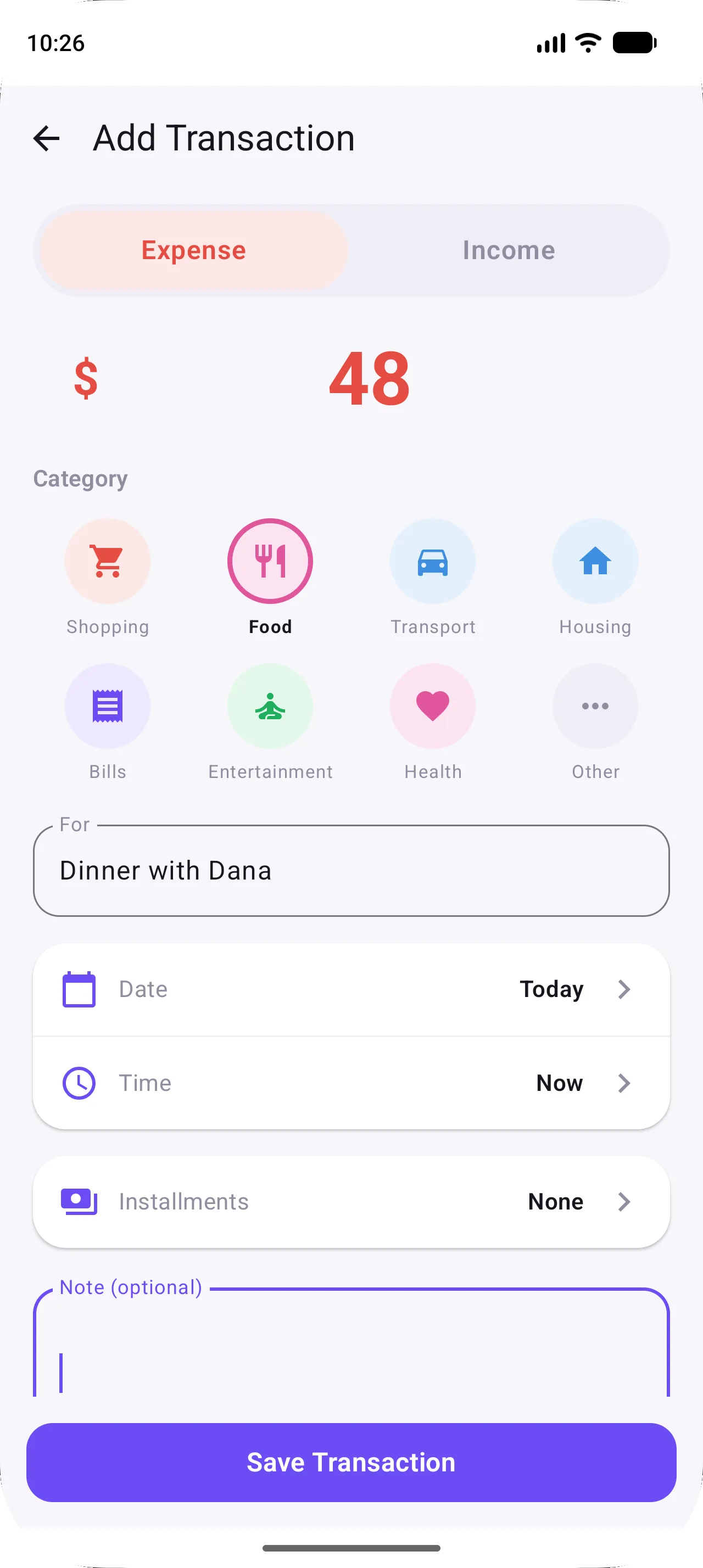
Don’t wait until the evening. Take the phone out while you are still at the checkout, tap +, type the amount, pick a category. In Japka this is one screen and takes a few seconds.
If you forget, no problem: you can set any date and time when you add it later. Paying in cash? See how to track cash spending.
2. Use a few broad categories
Fewer categories make logging faster and summaries easier to read. Japka keeps a short fixed list on purpose:
- Expenses: Shopping, Food, Transport, Housing, Bills, Entertainment, Health and Other.
- Income: Salary, Payment, Check, Transfer, Profit and Other.
Need more detail? Put it in the For field (“Supermarket”, “Takeaway”) instead of inventing a new category. The Feed’s search finds it later by that text.
3. Look at the summary once a week
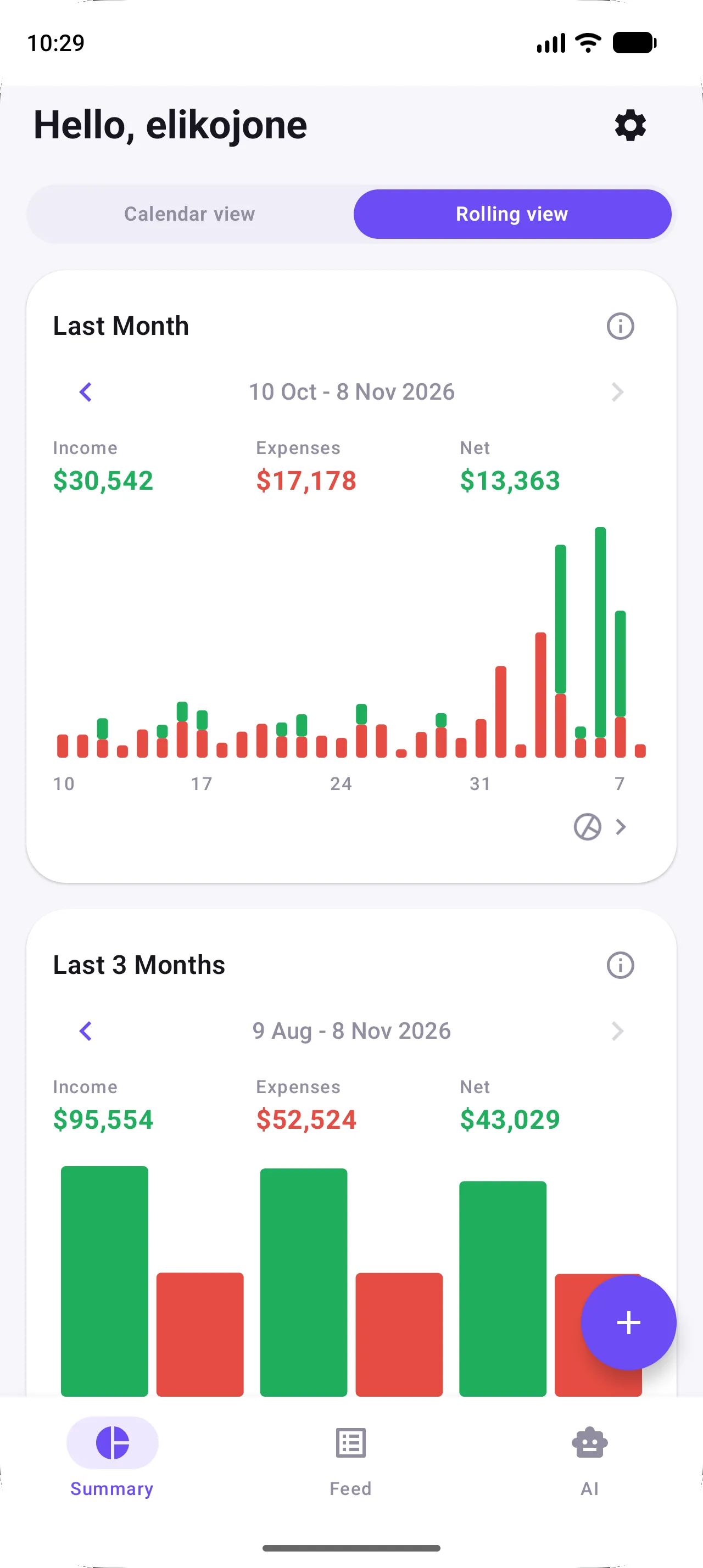
Open the Summary screen. It shows income, expenses and your net balance for the last month, the last three months and the last year, and the arrows on each card step back to earlier periods. A five-minute look on Sunday evening is enough to spot where the money went.
New to the app? Getting started: your first week walks through every screen.
Let your phone help (still without the bank)
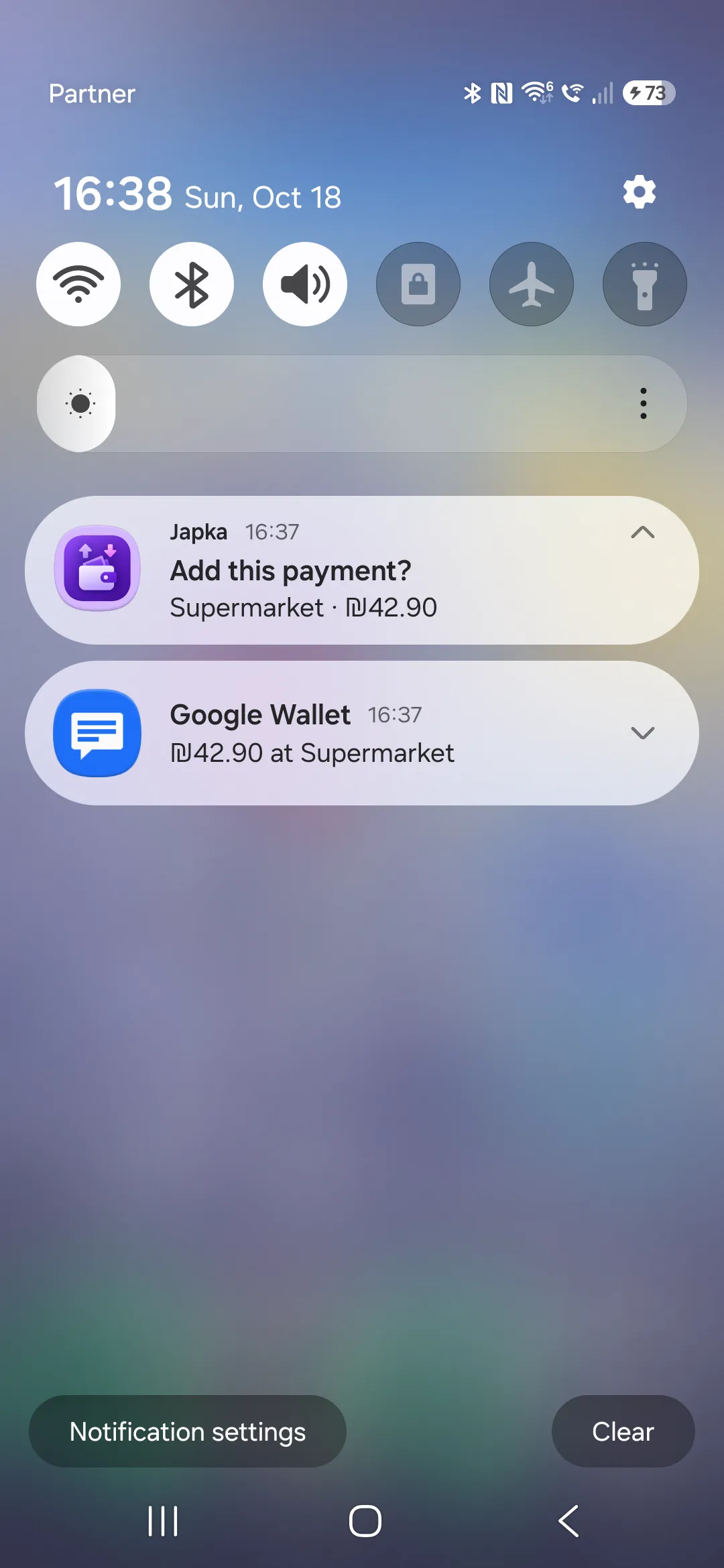
Japka has an optional payment detection feature that keeps you in control:
- On Android, Japka can read payment notifications from Google Wallet and supported credit card apps, then ask whether to add the payment. The notification content stays on your device.
- On iPhone, a Shortcuts automation can trigger when you pay with Apple Wallet and send the amount and merchant to Japka, which asks you to confirm.
You still approve every transaction. Nothing is pulled from your bank. See the full guide: Log card payments automatically.
What to look for in an expense tracker app
A good expense tracker or money manager without bank sync should be:
- Fast. Logging takes seconds, not minutes, or you will stop doing it.
- Clear. Monthly, quarterly and yearly totals you understand at a glance.
- Private. No bank credentials, and you can delete your data any time. In Japka, Settings → Current user → Delete account permanently removes your account and transactions.
- Realistic. Support for installments and for a budget you share with a partner.
In Israel? See how the options compare in the best budget app in Israel, or the RiseUp alternatives if you are leaving a bank-linked app.
Common mistakes to avoid
- Trying to be perfect. Rounding ₪19.90 to ₪20 is fine. Consistency matters more than precision.
- Tracking only expenses. Log your income too, so you can see your net balance and savings rate.
- Ignoring installments. A ₪3,600 laptop in 12 payments costs you ₪300 a month. Record it that way. Here’s how to budget installments.
- Giving up after a missed day. Just add the missing items with the right date and carry on.
- Starting from zero when you have history. If you kept a spreadsheet, import it from a CSV file so your trends start with real data.
Summary
You don’t need a bank connection to understand your money. Logging each transaction in a few seconds, keeping to a handful of categories and looking at your summary once a week gives you a clear, private picture of where your money goes. Once you can see it, a simple plan like the 50/30/20 rule tells you what to change.
FAQ
Is it safe to track expenses without a bank connection?
It is the safest option. No bank credentials are shared with any app, so there is nothing to leak. You decide exactly what is recorded.
Isn't manual expense tracking too much work?
With a fast app each transaction takes a few seconds, so a normal day takes under a minute. Japka can also detect card payments on your phone and ask you to confirm them.
Can I still log card payments without connecting my bank?
Yes. In Japka, payment detection reads card and wallet payment notifications on Android, or a Shortcuts automation on iPhone, and asks you to confirm each payment. Nothing is pulled from your bank.