
How to Track Your Subscriptions (and See What They Cost a Year)
Keep every subscription in one list, see its real monthly and yearly cost, and catch price increases and trials with a 10-minute monthly check.
Short answer: keep every subscription in one list with its price, how often it’s charged, the next charge date and the card that pays it. Turn every price into a monthly and yearly cost so you see the real total. Then spend 10 minutes a month comparing the list with your statement to catch new charges, price increases and trials that turned paid.
Subscriptions are easy to lose track of because they’re small and automatic. In a 2022 survey of 1,000 US consumers by C+R Research, 54% underestimated what they spend on subscriptions each month by at least $100, and 42% had forgotten they were still paying for one they no longer used (CNBC, reporting the C+R Research study).
This guide is about keeping track going forward. If you suspect you’re already paying for things you forgot, start with how to find and cancel forgotten subscriptions, then come back to build the list.
Step 1: Put every subscription in one place
Start with what you already know, then fill gaps from these places:
- App stores: iPhone: Settings > [your name] > Subscriptions (Apple). Android: Google Play > profile icon > Payments & subscriptions > Subscriptions (Google).
- Card statements: the last 3 months, so you catch quarterly charges too.
- Email: search for “receipt,” “renewal,” “your plan” and “trial.”
Count everything that charges you automatically: streaming, music, cloud storage, apps, news, gym, software, delivery memberships, phone and internet, insurance paid monthly. If it renews without you doing anything, it goes on the list.
Step 2: Write down five things for each one
| What | Why it matters |
|---|---|
| Name | As it appears on your statement, which is often different from the brand |
| Price | The current price, not the one you signed up at |
| How often | Weekly, monthly, yearly, or every few months |
| Next charge date | So yearly renewals don’t surprise you |
| Card or account | So you know where to look, and what breaks if the card expires |
The next charge date is the column people skip, and it’s the one that matters most for yearly plans. A $120 annual renewal lands once, in a month you didn’t plan for it.
Step 3: Turn every price into a monthly and yearly cost
Mixed billing cycles hide the total. Convert everything to the same unit:
- Yearly price ÷ 12 = monthly cost
- Weekly price × 52 ÷ 12 = monthly cost
- Monthly cost × 12 = yearly cost
Example
| Subscription | Price | Monthly | Yearly |
|---|---|---|---|
| Streaming | $15.49 / month | $15.49 | $185.88 |
| Music | $11.99 / month | $11.99 | $143.88 |
| Cloud storage | $99 / year | $8.25 | $99.00 |
| Meal kit | $5 / week | $21.67 | $260.00 |
| Phone plan | $45 / month | $45.00 | $540.00 |
| Total | $102.40 | $1,228.76 |
The monthly total is the number for your budget. The yearly total is the one that tells you if it’s worth it: $1,228 a year is a short trip, or a good part of an emergency fund.
Step 4: Do a 10-minute check every month
When your card statement arrives, compare it with the list:
- New charges: anything recurring that isn’t on the list? Add it, or cancel it.
- Price changes: is any price higher than what you wrote down? Update it, and decide if it’s still worth it.
- Trials: did a free trial turn paid this month?
- Next month’s renewals: any yearly charge coming? Make sure the money is there; a sinking fund for yearly renewals helps.
Once or twice a year, ask for each subscription: did I use it last month? If not, cancel it or pause it. You can always sign up again.
Step 5: Stop surprises before they start
- Write trials down the day you sign up, with the date they turn paid, and set a reminder two days before.
- Prefer monthly while you’re unsure. Yearly plans are cheaper only if you keep using them.
- Use one card for subscriptions if you can. One statement to check, and if the card is lost, you know exactly which services to update.
- Give subscriptions a monthly cap in your budget, like any other category; see envelope budgeting.
Tracking subscriptions in Japka
In Japka, a subscription is any transaction with a Subscription period. When you add it, set Subscription period (1, 2 or 3 years, or Until I cancel) and Payment every (week, month or year). Japka then adds the payment on each date by itself, and it counts in your totals only once its date arrives.
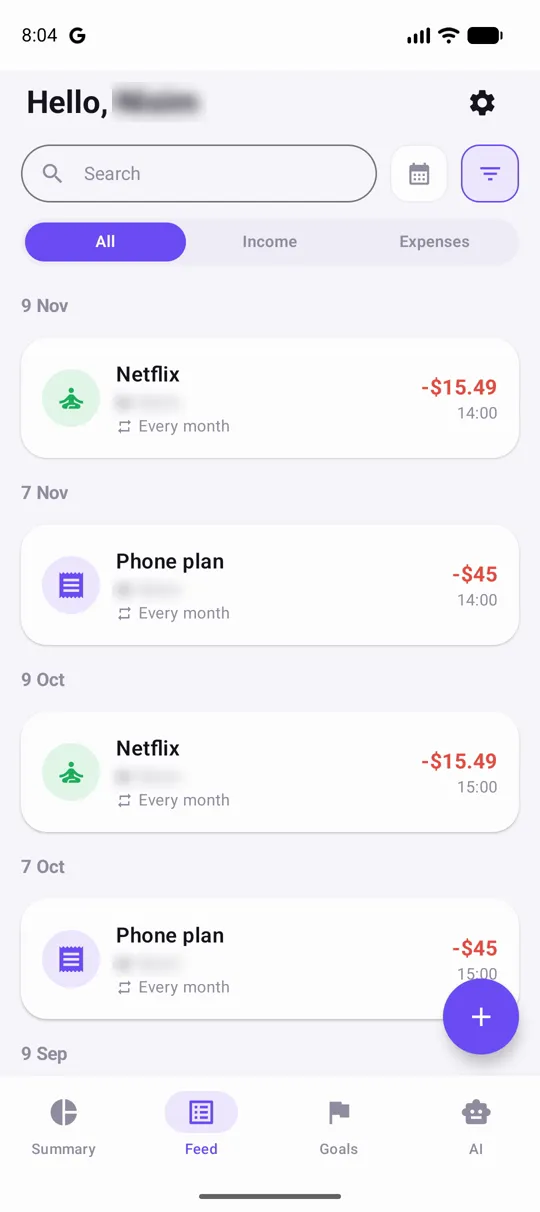
- See only your subscriptions: in the Feed, tap the filter button and turn on Subscriptions only. Every payment with a subscription period shows, newest first, so you can see what each one costs month after month.
- Spot price changes: edit a subscription when its price changes; the change applies to that payment and the upcoming ones, and earlier ones keep the old price.
- Stop one: open any of its payments and set Subscription period to None, or delete it. Upcoming payments are removed and earlier ones stay.
- With Premium, ask the AI tab “Which subscriptions do I pay for?” to get a list from your own transactions.
New to the app? Your first week with Japka covers the basics.
The bottom line
A subscription you can see is one you can decide about. Keep one list with price, cycle and next charge date, convert everything to monthly and yearly, and check it against your statement once a month. Ten minutes a month is enough to catch the price increase, the forgotten trial and the yearly renewal before they cost you.
FAQ
What is the best way to track subscriptions?
Keep one list with every recurring payment, its price, how often it's charged, the next charge date and which card pays it. Then check it once a month against your actual charges. A budget app that records recurring payments does most of this for you.
How do I compare monthly and yearly subscriptions?
Turn everything into a monthly cost. Divide a yearly price by 12, and multiply a weekly price by 52 and divide by 12. A $99 yearly plan is $8.25 a month; a $5 weekly plan is about $21.67 a month.
How often should I review my subscriptions?
Do a quick check once a month, when your card statement arrives, for new charges and price increases. Do a full review once or twice a year, asking for each one whether you used it last month.
How do I avoid being charged after a free trial?
Add the trial to your list the day you sign up, with the date it turns paid. Set a reminder two days before. If you already know you won't keep it, cancel right away; most services keep the trial running until its end date.