
How to Connect Grok to Your Budget With Japka
Step-by-step: add Japka to Grok with MCP, then ask Grok about your spending, income and budget. Read-only, takes about a minute.
Short answer: add Japka to Grok with the address https://japka-app.com/mcp, sign in to Japka and press Allow. Then ask Grok things like “How much did I spend on food last month?” and it answers from your real Japka data. The connection is read-only and part of Japka Premium.
Key takeaways
- Setup takes about a minute and you do it once.
- Grok can read your transactions and totals, but never add, edit or delete anything.
- Japka adds up totals on its own server, so the numbers match the app.
- The data Grok reads is handled by xAI under its privacy policy.
MCP (Model Context Protocol) is an open standard that lets AI chats like Grok connect to apps such as Japka. Japka runs an MCP server, so Grok can look up your data when you ask (modelcontextprotocol.io).
What you need
- A Japka account with Japka Premium (iPhone or Android)
- A Grok account on grok.com
Add Japka to Grok
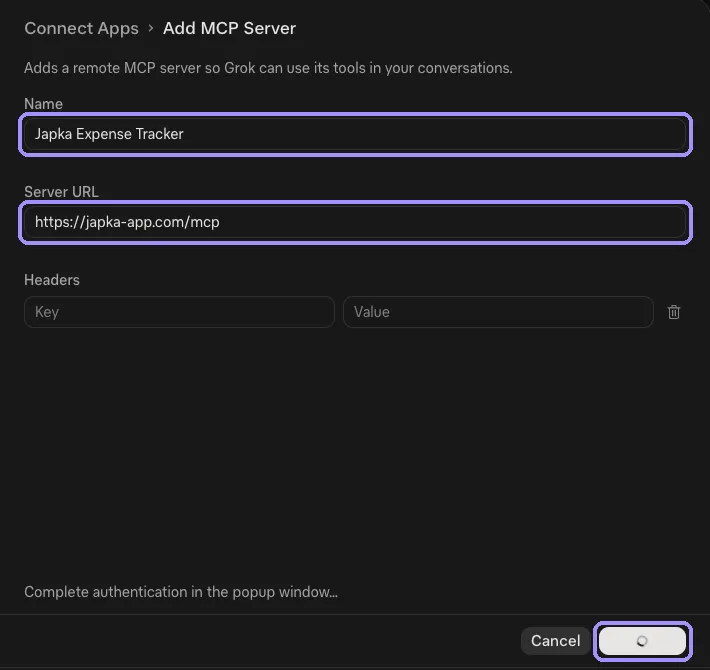
- Open grok.com/connectors, or in Grok go to Settings → Connect Apps.
- Scroll down and click Add a custom connector.
- Name it Japka and paste the Server URL:
https://japka-app.com/mcp - Add the connector. A Japka window opens: sign in with the same Google, Apple or email account you use in the app.
- Press Allow.
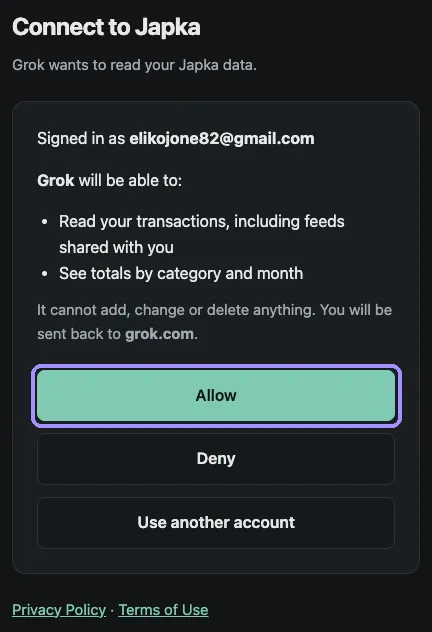
In a new chat, turn on Japka from the connectors menu, then ask your question (xAI docs).
Ask Grok about your money
Once Japka is on, ask in plain language:
- “How much did we spend in September, and on what?”
- “What were my 5 biggest expenses this month?”
- “Compare my food spending in August and September.”
- “What’s my savings rate for the last 3 months?”
- “Based on my spending, suggest a realistic monthly budget.”
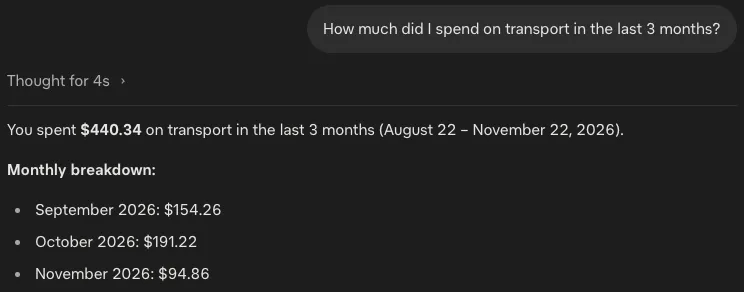
For a full routine, see AI prompts for a monthly money review. Questions about a partner’s spending work when you share a feed.
Troubleshooting
- No “Add a custom connector” button. Your plan may not include custom connectors. On Business or Enterprise, ask your admin.
- Grok answers without your data. Turn on Japka from the connectors menu in this chat and ask again.
- Wrong or empty numbers. Make sure you signed in with the same Google, Apple or email account you use in the Japka app.
- “Japka usage limit reached”. Fair-use limits keep the service fast for everyone. Wait a little and ask again.
- Sign-in window doesn’t open. Allow pop-ups for the Grok site, then reconnect.
Privacy and safety
Grok reads your Japka data only when a question needs it, never in the background. Feeds others shared with you are included, labeled with the owner’s name. What Grok reads is sent to xAI and handled under its privacy policy; Japka’s side is in our privacy policy. To keep everything on your phone instead, use the on-device AI assistant. For the bigger picture, see is it safe to give AI your financial data.
Other AI chats
Japka works the same way in ChatGPT, Claude, Gemini, Perplexity. All of them are covered in how to add Japka to your AI chat.
FAQ
Can Grok change or delete my transactions?
No. The Japka connection is read-only. Grok can look up transactions and totals when you ask, but it can never add, edit or delete anything.
Do I need a paid Grok plan?
Custom connectors are open to Grok users, and plans change often. On Business and Enterprise, an admin may need to set up connectors first.
Is the Japka side free?
The connection is part of Japka Premium. Logging, summaries and charts in Japka stay free.
How do I disconnect Japka from Grok?
Open grok.com/connectors, select Japka and remove it. Deleting your Japka account also revokes every AI connection.